Work P2 In development
FuCad
FreeCAD, reworked to feel like Fusion 360.
- GitHub stars
- 44
- commits on top of FreeCAD
- 63
- releases
- 22
The idea
FreeCAD is a capable open-source parametric modeler, but its interface asks you to think in workbenches: one toolbar layout per discipline, and a lot of switching between them. Fusion 360 organises the same work around the task in front of you.
FuCad is my fork of FreeCAD that brings that workflow over, while leaving the geometry kernel, document model, Python API and .FCStd file format alone. Existing FreeCAD documents, macros and addons keep working.
What I changed
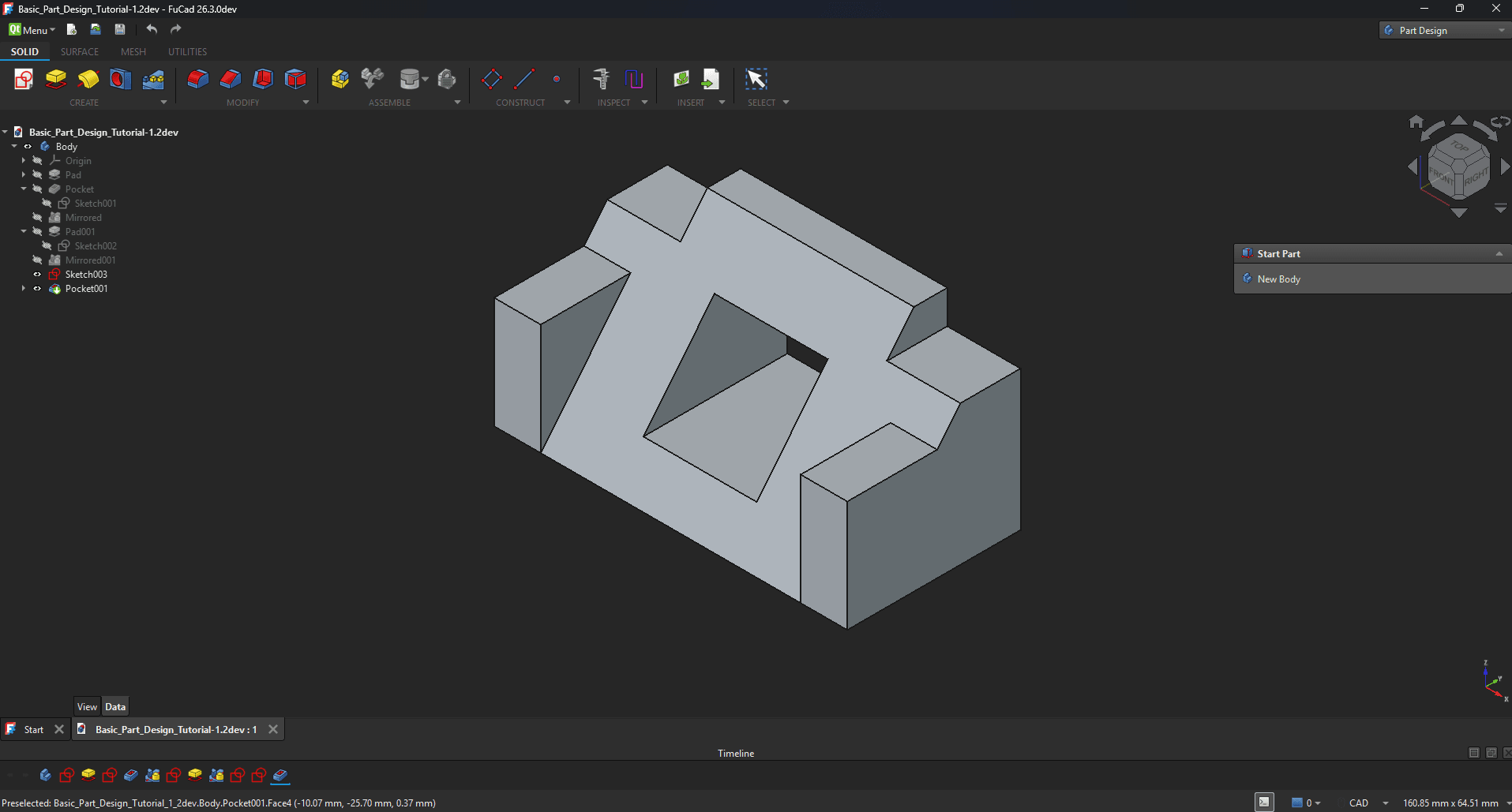
- A ribbon instead of workbench toolbars. Tabs for Solid, Surface, Mesh and Utilities, with panels for Create, Modify, Assemble, Construct, Inspect, Insert and Select. A contextual Sketch tab appears while you are sketching.
- A timeline dock. Features sit along the bottom of the window in the order they were made. Stepping the playhead back rolls the model back, sketches and datums included, and new features are built at that point in the history.
- One tool per operation. FreeCAD has separate additive and subtractive versions of the same tools. FuCad merges each pair into a single operation.
- Sketching that reads intent. You pick a profile region by clicking inside it, and the camera glides onto the sketch plane instead of cutting to it.
- A dark theme, new icons and Fusion’s keyboard shortcuts, so the muscle memory carries over.
Working inside a large codebase
Most of this lives in FreeCAD’s src/Gui, in C++ and Qt, next to code written by hundreds of other people over two decades. The discipline was to change how the application behaves without forking its core, which is why the changes are concentrated in the interface layer: upstream merges have to stay possible.
I also own the release pipeline: versioned builds, a Windows installer, and CI that can publish a release from a fork.
Where it stands
FuCad is an early-stage fork under active development.